 pilotfish
Browser agents in 2026: pilotfish vs Browserbase vs Browser Use
By Kushal Prakash · Last updated
pilotfish, Browserbase and Browser Use are three ways to run a browser agent, and they sell different things. Browserbase sells cloud browsers you automate yourself. Browser Use sells an open-source agent with a cloud. pilotfish sells the finished task, with proof of every step. On the same eight live tasks in November 2026, pilotfish cost $0.20 against $0.69 on Browser Use Cloud and finished in 16:53 against 43:00. All three solve CAPTCHAs. pilotfish publishes its price per solve and, when a check cannot be cleared, hands you the live browser so the task carries on.
Key takeaways
- Cheapest per task: pilotfish, at 29% of Browser Use Cloud's bill on the same eight tasks and the same model.
- List prices: pilotfish at $0.05 per browser hour and $4 per GB of residential proxy (the lowest proxy price). Browser Use Cloud is $0.02 and $5. Browserbase is $0.10 to $0.12 and $10 to $12 after its plan allowance.
- CAPTCHA solving: all three do it. pilotfish names the checks it solves and charges $0.0008 to $0.002 per solve.
- Best for raw browsers at scale with compliance: Browserbase.
- Best for an open-source agent you can self-host: Browser Use.
A year ago a browser agent was a demo. You watched it click around a flight site, clapped, and went back to doing the task yourself.
That has changed. Agents now log in, get past the bot check, download the invoice and come back with the file. The question is no longer whether a browser agent can do the job. It is which one you run it on, and what a finished task costs you.
Disclosure before anything else: I build pilotfish, so I have a horse in this race. I have tried to keep the comparison honest. Every number of ours below comes from our own benchmark records and price list, every competitor number from the public pages linked in the sources, and where we lose I say so.
What is a browser agent?
A browser agent is an AI model that operates a real web browser to complete a task: it opens pages, reads them, clicks, types, logs in and downloads files, without a script written for that site. You give it a goal in plain words, such as "download last month's invoices", and it works out the steps. A browser agent differs from a scraper, which only reads pages, and from classic automation such as Playwright scripts, which break when the page changes.
Are browser agents actually being used in 2026?
Yes. Browser agents are in real use in 2026, and the traction shows in three places: usage, cost per task and web traffic.
| Signal | Number | Source |
|---|---|---|
| Browserbase usage | 35M+ browser sessions a month | Browserbase history, Sep 2026 |
| Browser Use speed and cost | Average task from 123 s to 33.4 s, and from 39.2 cents to 1.9 cents, in one year | Browser Use, Nov 2025 |
| Silna Health agent volume | 20x growth in two quarters | Silna engineering |
The cost row is the real story. A task that cost 39 cents and took two minutes is a toy. The same task at 2 cents and half a minute is something you can put in a product.
The traffic side tells the same thing. HUMAN Security, the company whose bot checks agents keep running into, now publishes a monthly report on agent traffic. Its June 2026 edition is titled "Browser-agent tooling for developers is catching on fast".
One more sign. On 3 Nov 2026 LangChain published a benchmark of seven browser toolsets on 100 WebVoyager tasks. Every toolset passed between 78% and 90%, and Stagehand, from Browserbase, came first. Nobody benchmarks a category that has no users.
What are browser agents used for in the real world?
Browser agents are used wherever a website matters to the business and has no API: insurer portals, government forms, insurance quotes, invoices and research.
Healthcare paperwork. Silna Health submits prior authorizations to insurer portals with browser agents. Its engineering team wrote that "More than 75% of prior authorizations require submission through payor portals." Silna's agent volume grew 20x in two quarters, and agents now handle nearly half of all its prior authorizations, at over 90% completion and accuracy on the first portal it automated. (Silna engineering)
Insurance quotes and government forms. Skyvern says its users' top jobs are insurance quote requests, government form submissions and job applications. The examples it names are Geico quotes, California EDD forms and parts procurement on FinditParts. (Firecrawl's roundup)
Infrastructure at volume. Browserbase names Perplexity, Vercel, Shopify, Ramp, Lovable, Clay and Microsoft as customers. (Browserbase history)
What our own users send. People ran these tasks with us in the first week of November 2026:
- Search SAM.gov for open federal tenders, then start a registration.
- Check a company's status on India's NSWS portal.
- Pull the top posts of a subreddit as rows, like a scraper would.
- Find the cheapest flight on MakeMyTrip.
- Add groceries to a Swiggy Instamart cart.
- Build a list of sales prospects from many sites, with a source for each.
None of these is glamorous. All of them are someone's Tuesday afternoon.
And they do not always work. In one week our real users finished 3 of 11 runs. One Google Flights run got "something went wrong" for 50 steps in a row. That gap, between the benchmark and the live site, is what the rest of this article is about.
Why do browser agents fail on real websites?
Browser agents fail on real websites for four reasons, and the model is not one of them. Every vendor has a good model now.
- Bot checks. We reviewed all 35 tasks our tool missed on an earlier run of those 100 WebVoyager tasks. 17 were bot walls in headless mode. That is not a reasoning problem. No prompt fixes a Cloudflare interstitial.
- Identity. The site sees your IP, your fingerprint and even your TCP handshake. We measured this: HUMAN checked 7 of 10 page loads from residential exits whose handshake read Linux, and 0 of 10 from ones that read Windows. Same browser, same sites.
- Logins. Real tasks sit behind a password, a 2FA code or a one-time link. The agent needs them, and the model should never see them.
- Cost per finished task. Every page the agent reads is tokens. Every MB through a residential proxy is billed. A tool that needs twice the turns costs about twice as much, whatever its price list says.
So when you compare browser agents, do not ask which model they use. Ask what happens at the CAPTCHA, what happens at the login, and what the bill says at the end.
What is the difference between Browserbase, Browser Use and pilotfish?
Browserbase sells cloud browsers, Browser Use sells an open-source agent with a cloud, and pilotfish sells the finished task. They are not the same kind of product, and that matters more than any feature row.
Browserbase sells the browser. You get cloud Chrome sessions, proxies and CAPTCHA solving, and you bring the automation: your own Playwright code, or their Stagehand framework. It added a managed Agents service on 30 June 2026. It is infrastructure first, with subscriptions and enterprise paperwork (HIPAA BAAs, SSO) to match.
Browser Use sells the agent. It started as an open-source Python agent, widely used by developers, and built a cloud on top: hosted browsers, its own tuned models and pay-as-you-go billing. If you want to read the code and self-host the agent, this is the one.
pilotfish sells the finished task. We built the whole stack as one thing: our own Chrome DevTools client with no Playwright in the middle, a compact page outline for the model, and a rule that every action must return a before/after diff of the page. The model cannot claim it clicked something. The diff either shows it or it doesn't. On top of that sit saved logins, the bot-check ladder, approvals before anything irreversible, and a replay of every run.
It comes in two forms. A free local MCP (MIT, on npm) that drives Chrome on your own machine with your agent's own model. And a hosted service at pilotfish.gai.ventures, pay as you go from $5.
How do pilotfish, Browserbase and Browser Use compare on price and features?
We charge $0.05 per browser hour, Browser Use Cloud $0.02, and Browserbase $0.10 to $0.12 after its included hours. Residential proxy data costs $4 per GB with us, $5 on Browser Use Cloud and $10 to $12 on Browserbase. Prices are each vendor's public list as of 14 Nov 2026.
| pilotfish | Browserbase | Browser Use Cloud | |
|---|---|---|---|
| What you buy | A finished task, with proof | Cloud browsers you automate | An agent plus cloud browsers |
| Billing | Pay as you go from $5, no subscription | $20 or $99 a month, then overage; custom Scale plan | Pay as you go from $5, no subscription |
| Browser time, per hour | $0.05 | $0.12 or $0.10 after the 100 or 500 included hours | $0.02 |
| Residential proxy, per GB | $4 | $12 or $10 after the 1 or 5 included GB | $5 |
| Model tokens | Model's price + 20% | Market price through its gateway | Its own per-token list; 1.2x provider rates on API V3 |
| CAPTCHA solving | $0.0008 to $0.002 per solve | Included on paid plans, not on Free | Included, Free too |
| CAPTCHA types published | reCAPTCHA v2, v3 and Enterprise, hCaptcha, Arkose, Turnstile, AWS WAF, DataDome, press and hold | Not listed; custom ones need two CSS selectors from you | Not listed on the pages I opened |
| Stealth | On every hosted task, no extra charge | Basic on $20 and $99 plans; Verified browser on Scale only | Included, no separate price |
| Free option | Local MCP, no account, no key | 1 browser hour a month | $1 one-time credit |
| Concurrent sessions | Scales to your organisation's needs | 25, 100, then 250+ | 10, rising to 1,000 with spend |
| Open code | Local MCP is MIT on npm | Stagehand is open source | The agent is open source |
Sources: pilotfish pricing, Browserbase pricing, Browserbase CAPTCHA docs, Browser Use pricing (verified by them on 5 Nov 2026).
On concurrency, the other two publish fixed tiers. We set it per organisation: tell us how many browsers you need running at once and we scale it to that.
How does each browser agent handle CAPTCHAs?
All three tools solve CAPTCHAs. The difference is what happens around the solve.
Browserbase and Browser Use bundle solving into the session, and I could not find a published list of the checks they handle. Browserbase says a solve takes up to 30 seconds, and that blocks you cannot get past are a Scale-plan conversation with sales.
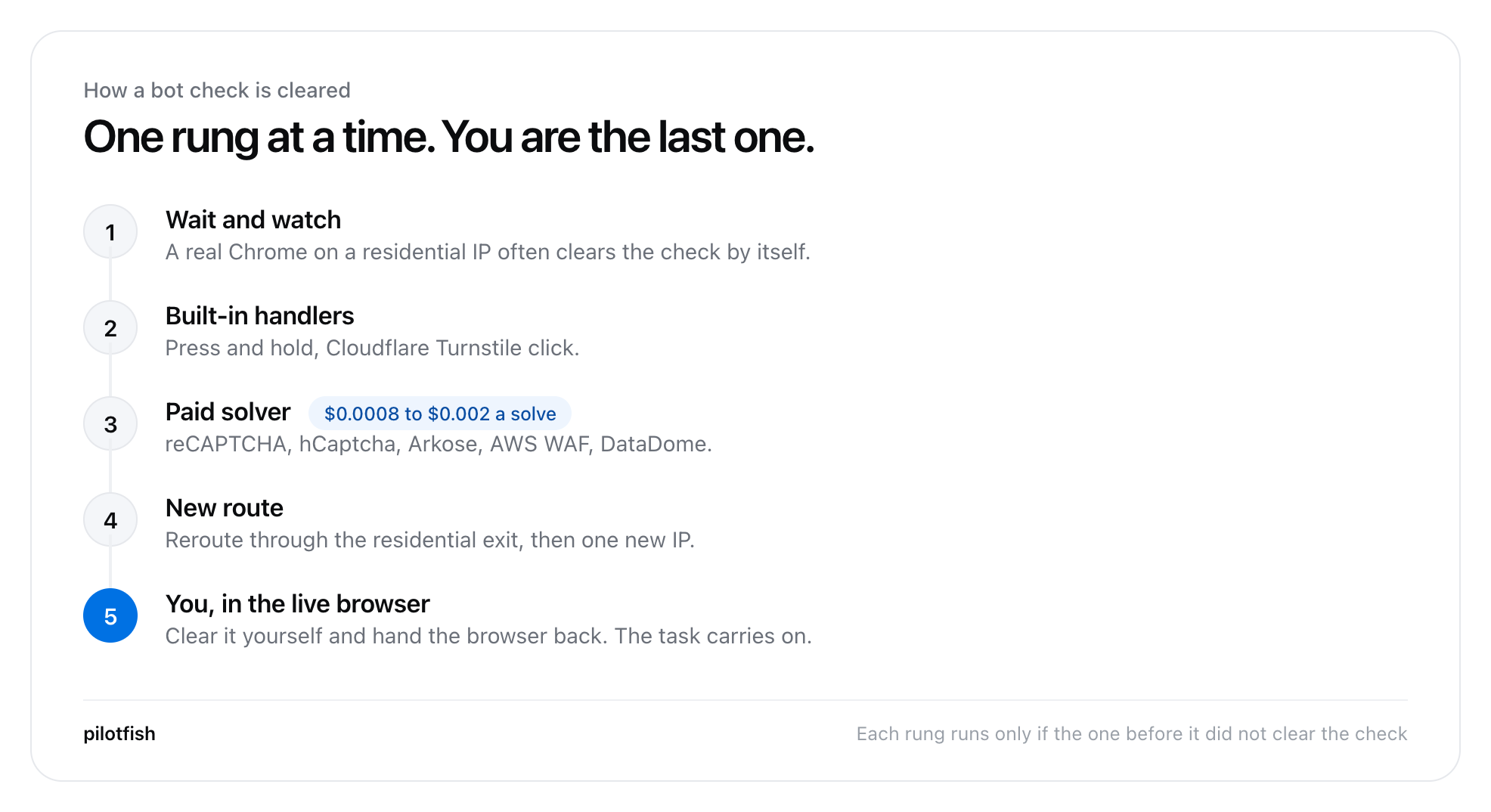
We treat a bot check as a ladder, and climb it only as far as it needs to. Often the check clears by itself once the site sees a real Chrome on a residential IP. If not, built-in handlers do the press-and-hold or the Turnstile click. Then a paid solver, priced per solve by type. Then a new exit IP. And if all of that fails, you get the live browser and clear it yourself, and the run carries on. The person is always the last step. The task does not just die.
Two more things we do that I have not seen on the other price lists. You can turn solving off per site. And we never solve or automate ticket sellers, whatever the task says.
Which browser agent is cheapest per finished task?
We were the cheapest per finished task in our own test: $0.20 for eight live tasks, against $0.69 on Browser Use Cloud. A price list tells you what an hour costs, not what a task costs. So we ran the same eight live tasks on both products: same model (GPT-6 Luna), same country, each pair started within 15 minutes of each other.
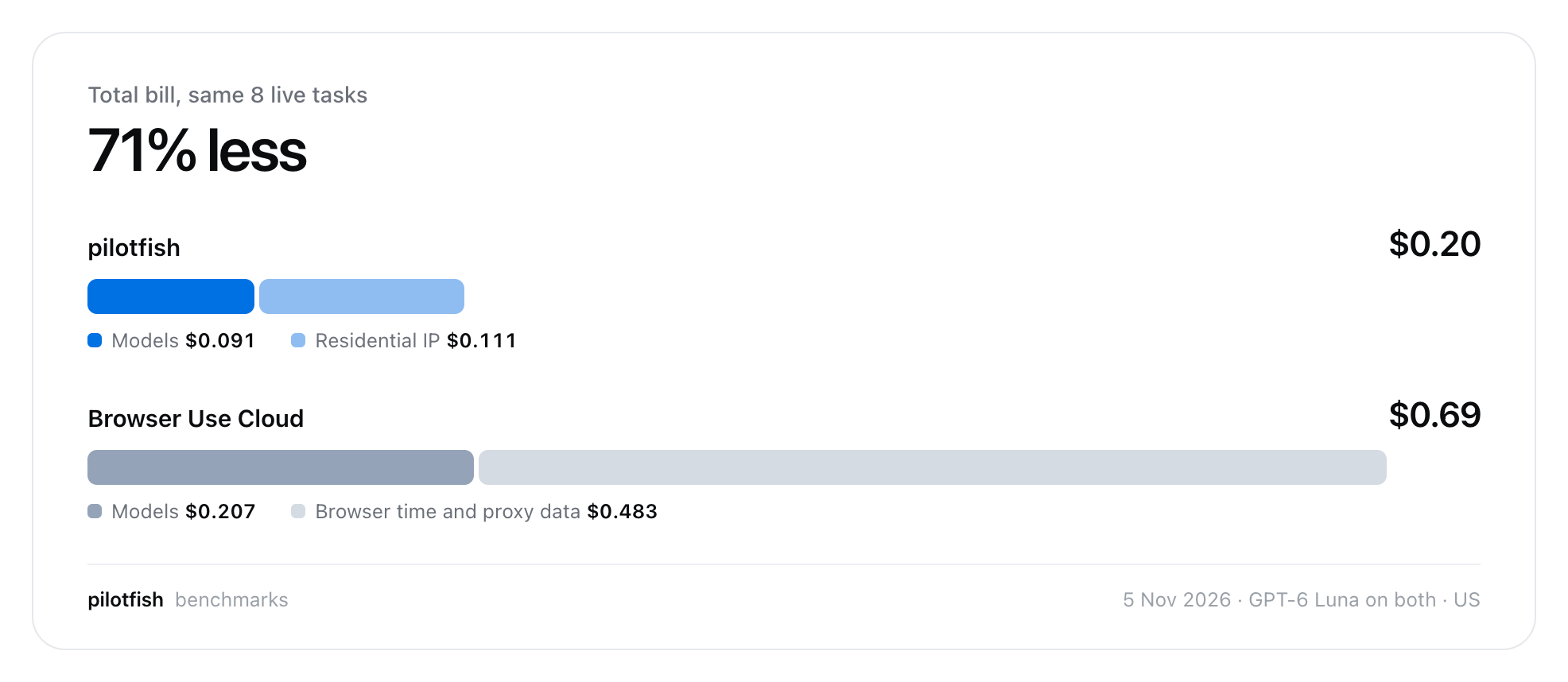
Our bill was 29% of Browser Use's. On the same model, our model spend alone was 44% of theirs. Most of what was left on their bill was proxy data.
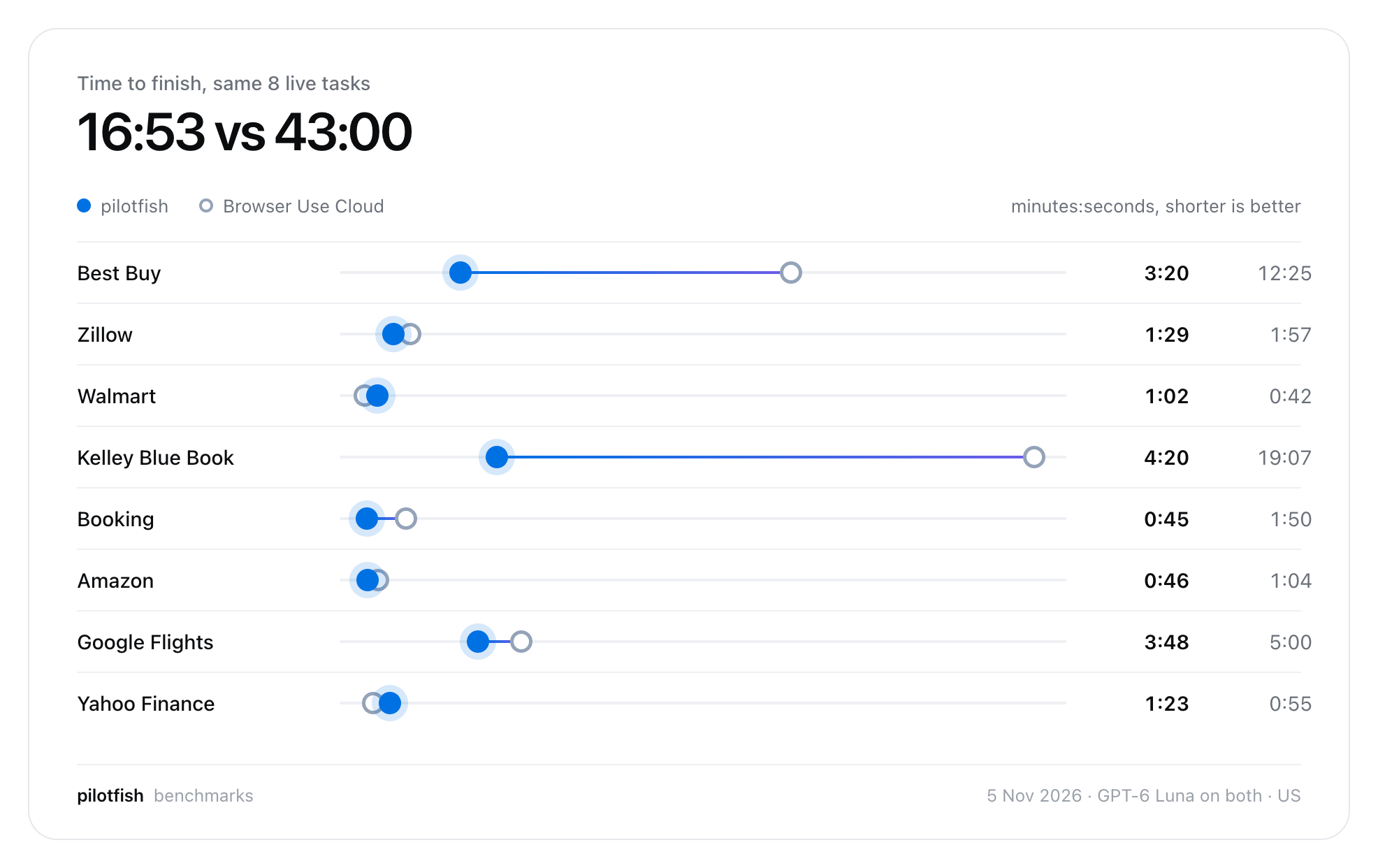
The medians are close, 1:26 against 1:54. The big gap comes from two tasks, Best Buy and Kelley Blue Book, where Browser Use spent 31 minutes. Browser Use was faster on Walmart and Yahoo Finance.
Now the honest part. This is our benchmark, on eight tasks, and that is a small sample. Both tools got all eight right in the end, but in the first round we got seven and a partial, and Browser Use got eight. We fixed it and reran. Browserbase is not in this race at all, because it sells browsers, not finished tasks. Its bill depends on the agent you put on top.
Why is pilotfish cheaper?
We are cheaper for three reasons, none of them magic.
- The model reads less. We reran LangChain's 100 WebVoyager tasks on 11 Nov 2026 with our local MCP next to Playwright MCP, on GPT-6 Luna. Ours used a median of 24.1K input tokens per task against 85.5K, and 5.5 turns against 11. Accuracy was a tie, 66 correct against 63. The model gets a compact outline of the screen once, and after that only the lines that changed.
- Paid traffic is rationed. Only the task's own sites go through the residential IP. Ads and trackers go direct. Public scripts and fonts come from a shared cache. Video does not load.
- No subscription. Browser time is billed by the minute at $0.05 an hour. You do not pay $20 or $99 a month to find out if it works.
What do 1,000 browser agent tasks a month cost?
On list prices, 1,000 browser agent tasks a month cost about $22 with us, $26 on Browser Use Cloud and $68 on Browserbase, before model tokens. The workload is 1,000 tasks a month, 2 minutes of browser and 5 MB of residential traffic each. That is 33 browser hours and 5 GB. Model tokens are left out, since they depend on the agent.
| Monthly infrastructure bill | How | |
|---|---|---|
| pilotfish | $21.67 | 33.3 h at $0.05, 5 GB at $4 |
| Browser Use Cloud | $25.67 | 33.3 h at $0.02, 5 GB at $5 |
| Browserbase Developer | $68.00 | $20 plan covers the hours and 1 GB; 4 GB more at $12 |
This is arithmetic on public price lists, not a measurement. At this size the proxy is the bill, and the browser hour barely matters.
Why is pilotfish a better browser agent?
Ours is the better browser agent when you need proof of what happened on the page, not only a lower bill. Here is the case beyond price.
It has to show its work. Most browser agents tell you they clicked the button. Ours returns a before/after diff of the page for every action. A click on a covered or stale element is refused instead of landing on whatever is on top. On our WebVoyager rerun, ours gave 6 wrong answers against 12 for Playwright MCP.
Your secrets never reach the model. Passwords and 2FA codes are placeholders in the prompt and get filled in at the browser. Logins sit in an encrypted vault. Authenticator codes, emailed codes and passkeys are handled without the model seeing any of them.
It stops before anything you cannot undo. Pay, order, send and delete wait for your yes, unless your own words already said go ahead.
It asks instead of failing. When a site needs something only you have, a code, a choice, a sign-in, you get a question or the live browser. Then the run carries on from where it was.
You can see every cent. Each task shows its cost while it runs, split into browser time, models, residential traffic and CAPTCHA solves. You can set a monthly limit.
When should you not choose pilotfish?
We are the wrong choice in five situations, and I would rather you hear them from me.
- Self-serve scale. Our concurrency scales with your organisation, but you set it up with us. Browserbase and Browser Use publish tiers you can buy into without a call.
- You already have Playwright code. Then you need browsers, not an agent. That is Browserbase.
- Enterprise paperwork. Browserbase offers HIPAA BAAs and SSO on its Scale plan. We are not there yet.
- You want to own the agent's code. Browser Use's agent is open source with a huge community. Our local MCP is free and MIT on npm, but the hosted stack is not open.
- Small-sample numbers. Eight tasks and one benchmark rerun are evidence, not proof. Run your own task on all three before you commit.
Which browser agent should you choose?
Choose a browser agent by what you want to buy: browsers, an agent, or a finished task. The three products here map to those three answers, so the right pick depends on which part of the work you want to keep in-house.
- You have automation code and need browsers at scale, with compliance: Browserbase.
- You want an open-source agent you can read, fork and self-host: Browser Use.
- You want the task done, proof that it was done, and the smallest bill for it: pilotfish.
Browser agents got real this year. The next year is not about who has the smartest model. It is about who finishes the task on a live site, shows you what happened, and charges you least for it. That is the product I am trying to build.
Try it on a task you actually have. The local MCP is one line, no account:
npx -y @gaiventures/pilotfish-mcpThe hosted version is at pilotfish.gai.ventures.
Frequently asked questions
Is pilotfish cheaper than Browser Use?
Yes, in our test. On eight live tasks run on 5 Nov 2026 with the same model and country, our whole bill was $0.20 and Browser Use Cloud's was $0.69. That was at our browser price then, $0.02 an hour (now $0.05; Browser Use Cloud's is $0.02). We used fewer model tokens and less proxy data, which is most of the bill.
Is pilotfish cheaper than Browserbase?
On list price, yes. We charge $0.05 per browser hour and $4 per GB of residential proxy with no subscription. Browserbase's paid plans start at $20 a month, then $0.12 per extra browser hour and $12 per extra GB. Browserbase sells browsers rather than finished tasks, so the agent's model cost is on top.
Does pilotfish solve CAPTCHAs?
Yes. It solves reCAPTCHA v2, v3 and Enterprise, hCaptcha, Arkose FunCaptcha, Cloudflare Turnstile, AWS WAF, DataDome and press-and-hold checks, at $0.0008 to $0.002 per solve. If a check cannot be cleared, you get the live browser to clear it yourself and the task carries on.
Do Browserbase and Browser Use solve CAPTCHAs?
Yes. Browserbase includes automatic CAPTCHA solving on its paid plans and says a solve takes up to 30 seconds. Browser Use Cloud includes CAPTCHA solving on free and paid accounts. I could not find a published list of the checks either one solves.
Is pilotfish open source?
Partly. The local MCP is free and MIT licensed on npm, and needs no account or API key. The hosted service, with stealth, residential IPs and CAPTCHA solving, is not open.
Can a browser agent log in with my password and 2FA code?
Yes. We keep logins in an encrypted vault and type them into the browser as placeholders, so the model never sees a password or a code. It handles authenticator codes, emailed codes and passkeys.
How many browsers can pilotfish run at once?
Concurrency scales to each organisation's needs. Browserbase publishes tiers of 25, 100 and 250 or more concurrent browsers, and Browser Use Cloud goes from 10 to 1,000 with spend.
How do I try pilotfish?
Run npx -y @gaiventures/pilotfish-mcp to use the free local MCP with Claude Code, Cursor or Codex. For the hosted service, sign up at pilotfish.gai.ventures and add credits from $5.
Sources
- pilotfish: pricing and benchmarks; head-to-head and WebVoyager numbers from our own records (5 and 11 Nov 2026)
- Browserbase pricing and CAPTCHA solving docs
- Browser Use pricing and One year of progress
- History of Browserbase (sessions and customers)
- Silna Health: Beyond the Agent
- LangChain: How we optimized browser use for Deep Agents (3 Nov 2026)
- Firecrawl: best browser agents (Skyvern use cases)
- HUMAN Security, State of Agentic Traffic, June 2026